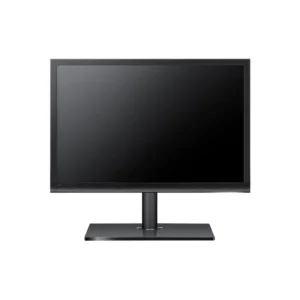
HP L2105tm 21.5″ Touch Monitor – Full HD IPS LCD with Touchscreen
The HP L2105tm Touch Monitor offers a 21.5″ Full HD (1920×1080) touchscreen with intuitive edge-to-edge glass. Featuring VGA and DVI inputs, multi-touch capability, and a swivel-tilt stand, it’s ideal for point-of-sale, education, and interactive presentations.
£ 319
- Free shipping within the UK (T&C)
- Delivery available via DHL, Bank Transfer,FedEx & UPSVisa
- Mastercard, AMEX, Wire are accepted
Key Specifications
- Model: HP L2105tm / Compaq L2105tm (EM891AA#ABA)
- Display: 21.5″ Full HD (1920×1080) TFT LCD with multi-touch
- Touch Type: Edge-to-edge capacitive touchscreen
- Brightness: 250 cd/m²
- Contrast Ratio: 1000:1
- Response Time: 8 ms gray-to-gray
- Viewing Angles: 160° H / 160° V
- Inputs: VGA (HD-15), DVI-D
- Speakers: No internal speakers
- Energy Use: Low power LED-backlit design
- Mounting: VESA 100×100 mm compatible
- Stand Adjustments: Tilt, swivel, and height optional
Why Choose HP L2105tm Touch Monitor
- Fully interactive 21.5″ Full HD touchscreen offers smooth, accurate touch response for commercial or educational environments.
- Edge-to-edge glass gives a modern, sleek look and easy cleaning—great for public-use kiosks and POS terminals.
- Dual video inputs support both current and legacy devices, simplifying integration.
- Durable and commercial-grade, designed for everyday industrial, retail, or classroom environments.
- VESA support allows for flexible mounting—wall, stand, or arm-based installation.
Compatibility
- Compatible with most PCs, thin clients, and media devices via VGA or DVI.
- Supports Windows touch drivers, including Windows 7/8/10/11.
- Works with POS systems, educational kiosks, and conference-room setups.
- VESA-compatible for mounting on arms, walls, or stands.
Installation
- Secure the monitor using its swivel-tilt stand or mount on a VESA bracket (100×100 mm).
- Connect your device via VGA or DVI cable.
- Plug in power and turn on the screen.
- Calibrate touch via Windows Display settings if required.
- Adjust tilt and swivel for optimal touch ergonomics.
- Start touch-enabled apps or kiosk software in interactive environments.